
コドモンのデイリーボードに「学校名」を追加するブックマークレット"CCV" | Codmon Custom View
コドモンのデイリーボードで学童を運営していると、学校ごとに児童を見たい場面があります。
たとえば、学校ごとの人数確認、送迎の確認、同じ学校の児童の把握などです。
ただ、画面上で学校名がまとまって見えないと、毎回目で探すことになり、確認に時間がかかります。
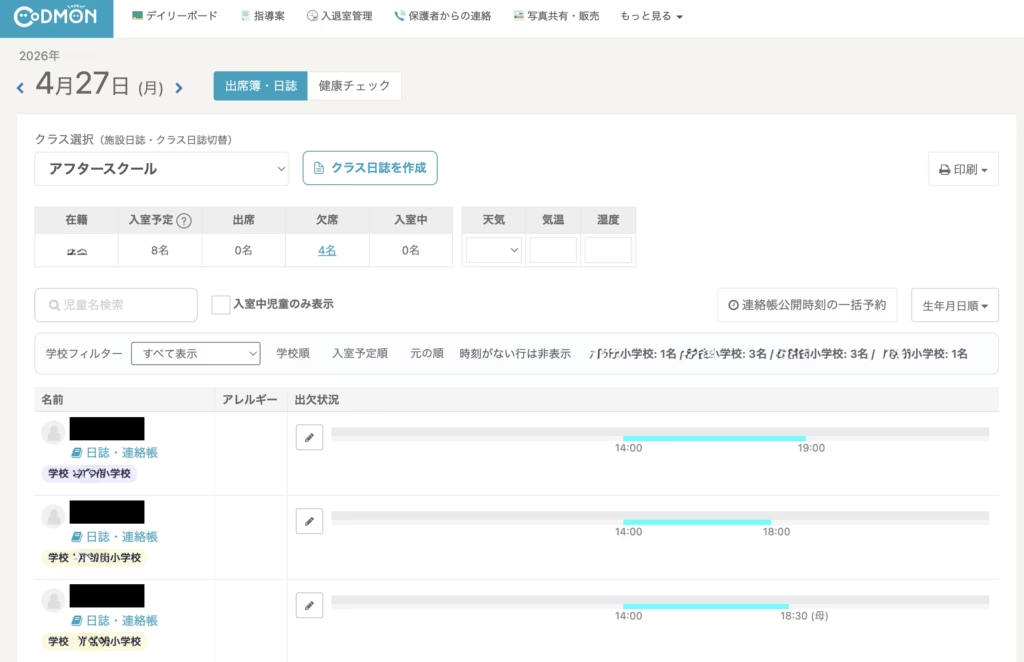
そこで、デイリーボードの一覧表に「学校名」を追加するブックマークレットを作りました。
このコードを使うと、表の中に新しく「学校名」が表示され、学校ごとの確認や並べ替えがしやすくなります。
また、入室した順番にソートもできます。
このブックマークレットでできること
このコードは、デイリーボード内の表を見つけて、「アレルギー」欄の中に含まれている小学校名を読み取り、新しく「学校」列を追加します。(アレルギー内には必ず「〇〇小学校」と正式名称にすることで精度がよくなります。)
その結果、次のような場面で見やすくなります。
・学校ごとの児童確認
・送迎前の学校別チェック(送迎グループは事前にコドモンの設定で作成しておくこと)
・同じ学校の児童の把握
・表を見ながらの並べ替え作業
最初から、出欠状況に時刻が1つもない行は非表示になります。
つまり、13:00 などの時刻が出ている児童だけが対象です。
「学校順」を押すと、学校名で並び替えます。
同じ学校の中では、入室予定時刻、その次に名前で並びます。
「入室予定順」を押すと、13:00 → 13:30 → 14:00 のように並びます。
同時刻なら学校名、その次に名前で並びます。
「元の順」を押すと、元の表示順に戻します。
フィルターも解除します。
注意点
このブックマークレットは、画面の見た目をその場で変えるものです。
コドモンの保存データそのものを変更するものではありません。
児童台帳にあるアレルギー欄には本来小学校を書く場所ではありません。ここに施設から記入しても保護者アプリ上には表示されませんが、実際の運用手順とは異なることを事前に理解しておいてください。(デイリーボードに表示させるためには、ここしかなかった...)
ただし、コドモン側の画面構成や表示項目が変わると、動かなくなる可能性があります。
また、学校名の書かれ方によっては正しく拾えない場合があります。(ex 〇〇小など略したり)
利用前に内容を確認し、自己責任で使用してください。
使い方
- ブラウザで新しいブックマークを作成します。(事前に学校名を児童台帳のアレルギー欄に記入しておくこと)
- ブックマークの名前は「CCV」とか「学校名追加」など分かりやすいものにします。
- URL欄に、下のコードをそのまま貼り付けます。
- コドモンのデイリーボードを開いた状態で、そのブックマークを押します。
- 児童名の下に「学校名」が追加されれば成功です。
CCV ブックマークレット本体
javascript:(()=>{const NS="cshv2";const STYLE_ID=`${NS}-style`;const UI_ID=`${NS}-ui`;const BADGE_CLASS=`${NS}-badge`;const HIDDEN_CLASS=`${NS}-hidden`;function norm(t){return String(t||"").replace(/\u00A0/g," ").replace(/%E3%80%80/g," ").replace(/\s+/g," ").trim()}function schoolNorm(t){let v=norm(t).replace(/[((].*?[))]/g,"").replace(/[::]/g,"").trim();if(!v)return"";if(v.endsWith("小学校"))return v;if(v.endsWith("小"))return v+"学校";return""}function shortSchool(t){return t.endsWith("小学校")?t.replace(/小学校$/,"小"):t}function esc(t){return t.replace(/[.*+?^${}()|[\]\\]/g,"\\$&")}function findTable(){const tables=[...document.querySelectorAll("table")];for(const table of tables){const heads=[...table.querySelectorAll("th")].map(x=>norm(x.textContent));if(heads.includes("名前")&&heads.includes("アレルギー")&&heads.includes("出欠状況"))return table}return null}function getInfo(table){const ths=[...table.querySelectorAll("tr:first-child th")];const heads=ths.map(x=>norm(x.textContent));const nameIndex=heads.indexOf("名前");const allergyIndex=heads.indexOf("アレルギー");const statusIndex=heads.indexOf("出欠状況");if(nameIndex<0||allergyIndex<0||statusIndex<0)return null;return{nameIndex,allergyIndex,statusIndex}}function rows(table){return [...table.querySelectorAll("tr")].slice(1).filter(r=>r.querySelectorAll("td").length>=3)}function addStyle(){let s=document.getElementById(STYLE_ID);if(s)return;s=document.createElement("style");s.id=STYLE_ID;s.textContent=`#${UI_ID}{margin:12px 0;padding:10px 12px;border:1px solid #d9e2f0;border-radius:8px;background:#fbfdff;display:flex;flex-wrap:wrap;gap:8px 10px;align-items:center;font-size:13px}#${UI_ID} select,#${UI_ID} button{font-size:13px;padding:4px 8px}.${BADGE_CLASS}{display:inline-block;margin-top:4px;padding:2px 8px;border-radius:999px;font-size:12px;line-height:1.4;font-weight:600;max-width:180px;overflow:hidden;text-overflow:ellipsis;white-space:nowrap;background:#e9f3ff;color:#234}.${HIDDEN_CLASS}{display:none!important}%60;document.head.appendChild(s)}function colorOf(school){const colors=["#e8f1ff","#eaf8ef","#fff4e5","#f3ebff","#ffecef","#eaf7f7","#fff9db","#eef2ff"];let h=0;for(let i=0;i<school.length;i++){h=((h<<5)-h)+school.charCodeAt(i);h|=0}return colors[Math.abs(h)%colors.length]}function restore(table,info){rows(table).forEach((row,i)=>{row.classList.remove(HIDDEN_CLASS);row.removeAttribute(%60data-${NS}-school%60);row.removeAttribute(%60data-${NS}-time%60);row.removeAttribute(%60data-${NS}-name%60);if(!row.hasAttribute(%60data-${NS}-origindex%60))row.setAttribute(%60data-${NS}-origindex%60,String(i));const tds=[...row.querySelectorAll("td")];const nameCell=tds[info.nameIndex];const allergyCell=tds[info.allergyIndex];if(nameCell){nameCell.querySelectorAll(%60.${BADGE_CLASS}%60).forEach(el=>el.remove())}if(allergyCell&&allergyCell.hasAttribute(%60data-${NS}-origallergy%60)){allergyCell.textContent=allergyCell.getAttribute(%60data-${NS}-origallergy%60)||""}});const old=document.getElementById(UI_ID);if(old)old.remove()}function buildCandidates(table,info){const set=new Set();const pats=[/([^\s、,//()()\n\r]+小学校)/g,/([^\s、,//()()\n\r]+小)(?!学校)/g];rows(table).forEach(row=>{const cell=row.querySelectorAll("td")[info.allergyIndex];if(!cell)return;const text=String(cell.textContent||"");for(const p of pats){for(const m of text.matchAll(p)){const s=schoolNorm(m[1]);if(s)set.add(s)}}});return [...set].sort((a,b)=>b.length-a.length)}function extractSchool(text,cands){const src=String(text||"");for(const school of cands){const short=shortSchool(school);const pats=[new RegExp(%60(^|[\\s、,//])${esc(school)}(?=$|[\\s、,//((])%60),new RegExp(%60(^|[\\s、,//])${esc(short)}(?=$|[\\s、,//((])%60)];for(const p of pats){if(p.test(src))return school}}return""}function cleanAllergy(text,school){let v=String(text||"");if(!school)return norm(v);const short=shortSchool(school);const pats=[new RegExp(%60(^|[\\s、,//])${esc(school)}(?=$|[\\s、,//((])%60,"g"),new RegExp(%60(^|[\\s、,//])${esc(short)}(?=$|[\\s、,//((])%60,"g")];for(const p of pats){v=v.replace(p," ")}return v.replace(/[ \t]+/g," ").replace(/ ?\n ?/g,"\n").replace(/^[、,//\s]+|[、,//\s]+$/g,"").replace(/\n{2,}/g,"\n").trim()}function extractTime(text){const m=String(text||"").match(/\b([01]?\d|2[0-3]):([0-5]\d)\b/);return m?%60${m[1].padStart(2,"0")}:${m[2]}%60:""}function prepare(table,info){const cands=buildCandidates(table,info);rows(table).forEach(row=>{const tds=[...row.querySelectorAll("td")];const nameCell=tds[info.nameIndex];const allergyCell=tds[info.allergyIndex];const statusCell=tds[info.statusIndex];if(!nameCell||!allergyCell||!statusCell)return;if(!allergyCell.hasAttribute(%60data-${NS}-origallergy%60)){allergyCell.setAttribute(%60data-${NS}-origallergy%60,allergyCell.textContent||"")}const orig=allergyCell.getAttribute(%60data-${NS}-origallergy%60)||"";const school=extractSchool(orig,cands);const time=extractTime(statusCell.textContent||"");const name=norm(nameCell.textContent).replace(/\s*デモ.*$/,"").replace(/\s*日誌・連絡帳.*$/,"").trim();row.setAttribute(%60data-${NS}-school%60,school);row.setAttribute(%60data-${NS}-time%60,time);row.setAttribute(%60data-${NS}-name%60,name);if(school){const badge=document.createElement("div");badge.className=BADGE_CLASS;badge.textContent=%60学校:${school}%60;badge.style.background=colorOf(school);nameCell.appendChild(badge)}allergyCell.textContent=cleanAllergy(orig,school)});return cands}function visibleTarget(row,school){const rowSchool=row.getAttribute(%60data-${NS}-school%60)||"";const rowTime=row.getAttribute(%60data-${NS}-time%60)||"";return !!rowTime&&(!school||rowSchool===school)}function applyFilter(table){const sel=document.getElementById(%60${NS}-select%60);const school=sel?sel.value:"";rows(table).forEach(row=>{row.classList.toggle(HIDDEN_CLASS,!visibleTarget(row,school))})}function sortRows(table,mode){const rs=rows(table);if(!rs.length)return;const parent=rs[0].parentNode;const sorted=[...rs].sort((a,b)=>{if(mode==="original"){return Number(a.getAttribute(%60data-${NS}-origindex%60))-Number(b.getAttribute(%60data-${NS}-origindex%60))}const as=a.getAttribute(%60data-${NS}-school%60)||"";const bs=b.getAttribute(%60data-${NS}-school%60)||"";const at=a.getAttribute(%60data-${NS}-time%60)||"";const bt=b.getAttribute(%60data-${NS}-time%60)||"";const an=a.getAttribute(%60data-${NS}-name%60)||"";const bn=b.getAttribute(%60data-${NS}-name%60)||"";if(mode==="school"){const c=as.localeCompare(bs,"ja");if(c!==0)return c;if(at!==bt)return at.localeCompare(bt,"ja");return an.localeCompare(bn,"ja")}if(mode==="time"){if(at!==bt)return at.localeCompare(bt,"ja");const c=as.localeCompare(bs,"ja");if(c!==0)return c;return an.localeCompare(bn,"ja")}return 0});sorted.forEach(r=>parent.appendChild(r))}function summary(table){const out=document.getElementById(%60${NS}-summary%60);if(!out)return;const counts=new Map();rows(table).filter(r=>!r.classList.contains(HIDDEN_CLASS)).forEach(r=>{const s=r.getAttribute(%60data-${NS}-school%60)||"学校未設定";counts.set(s,(counts.get(s)||0)+1)});out.textContent=[...counts.entries()].sort((a,b)=>a[0].localeCompare(b[0],"ja")).map(([s,c])=>%60${s}: ${c}名%60).join(" / ")||"表示対象なし"}function buildUI(table,cands){let ui=document.getElementById(UI_ID);if(ui)ui.remove();ui=document.createElement("div");ui.id=UI_ID;const label=document.createElement("span");label.textContent="学校フィルター";const sel=document.createElement("select");sel.id=%60${NS}-select%60;const all=document.createElement("option");all.value="";all.textContent="すべて表示";sel.appendChild(all);cands.slice().sort((a,b)=>a.localeCompare(b,"ja")).forEach(s=>{const count=rows(table).filter(r=>(r.getAttribute(%60data-${NS}-school%60)||"")===s&&(r.getAttribute(%60data-${NS}-time%60)||"")).length;const o=document.createElement("option");o.value=s;o.textContent=%60${s} (${count}名)%60;sel.appendChild(o)});sel.addEventListener("change",()=>{applyFilter(table);summary(table)});const schoolBtn=document.createElement("button");schoolBtn.type="button";schoolBtn.textContent="学校順";schoolBtn.addEventListener("click",()=>{sortRows(table,"school");applyFilter(table);summary(table)});const timeBtn=document.createElement("button");timeBtn.type="button";timeBtn.textContent="入室予定順";timeBtn.addEventListener("click",()=>{sortRows(table,"time");applyFilter(table);summary(table)});const resetBtn=document.createElement("button");resetBtn.type="button";resetBtn.textContent="元の順";resetBtn.addEventListener("click",()=>{sortRows(table,"original");sel.value="";applyFilter(table);summary(table)});const note=document.createElement("span");note.textContent="時刻がない行は非表示";note.style.color="#475569";const sum=document.createElement("span");sum.id=%60${NS}-summary%60;sum.style.marginLeft="8px";sum.style.fontWeight="600";ui.append(label,sel,schoolBtn,timeBtn,resetBtn,note,sum);table.parentNode.insertBefore(ui,table)}function run(){const table=findTable();if(!table){alert("対象の表が見つかりません");return}const info=getInfo(table);if(!info){alert("列情報を取得できません");return}addStyle();restore(table,info);const cands=prepare(table,info);buildUI(table,cands);applyFilter(table);summary(table)}run();})();
補足
毎日見る画面は、少し見やすくなるだけでも運営の負担が変わります。
コドモンは保育施設に特化した開発のため、学童むけには調整が必要です。学童では、学校ごとの確認が必要になることが多いため、こうした小さな改善でも実務上はかなり役立ちます。
同じように、現場で毎日使う画面の見にくさを減らしていくことで、確認ミスの予防や作業時間の短縮にもつながります。ぜひ現場で"CCV" | Codmon Custom Viewを使ってみてください。
ブラウザはChromeを使っています。
まずは見学・体験から
教室の雰囲気は、来ていただくのが一番伝わります。平日14:00から見学・体験を受け付けています(事前予約制)。
2027年4月に小学校へ入学するお子さまは 2027年度 入会案内 をご覧ください。


