Kids handle their morning routine and today's plan themselves: Craftsman's DAILY BOARD HOME
 bot@flaur.jp
"What do we have today again?" "What time do you get out of school today?" Many families probably have this kind of conversation at the front door in the morning.
At Craftsman, we wanted children to be able to check the day's plan themselves, so we created "DAILY BOARD HOME," which you open on a tablet at home. Place the tablet in landscape orientation in the living room or similar, and use it in the morning and when your child gets home. We recommend an iPad as the tablet. It is mainly designed for children in grades 1 to 4 of elementary school.
In this article we introduce what the board can do and what parents need to set up.
Check Home to see today's plan
When you open the board, the "Home" screen appears first. The time to leave home, the time school starts, the time school ends, whether it is a day to come to Craftsman, and lessons are lined up in time order. A red line marks the current time, so you can see at a glance what comes next.
The end-of-school time and school events appear once a parent loads the school newsletter (event schedule) PDF. The times to leave home and to finish school also come with the weather for that time, and on days when rain is likely, "umbrella" is shown. You can also see the school lunch menu and tomorrow's plan on the same screen. For the elementary schools of Kitayamata, Higashiyamata, Nakagawa, Nakagawa-nishi, Ushikubo, Minamiyamata, Yamata, Eda, Katsuta, and Hiyoshidai, the lunch menu is linked automatically to Yokohama City's school lunch menu and appears every month (there is no need to send in the school lunch newsletter).
The "Schedule" screen shows a whole week's plan at once. In addition to school events, for months when a school newsletter has been loaded, it also shows the number of class periods that day. You can also use it at the start of the week to plan ahead together with your child.
Morning routines and after-school tasks with "Missions"
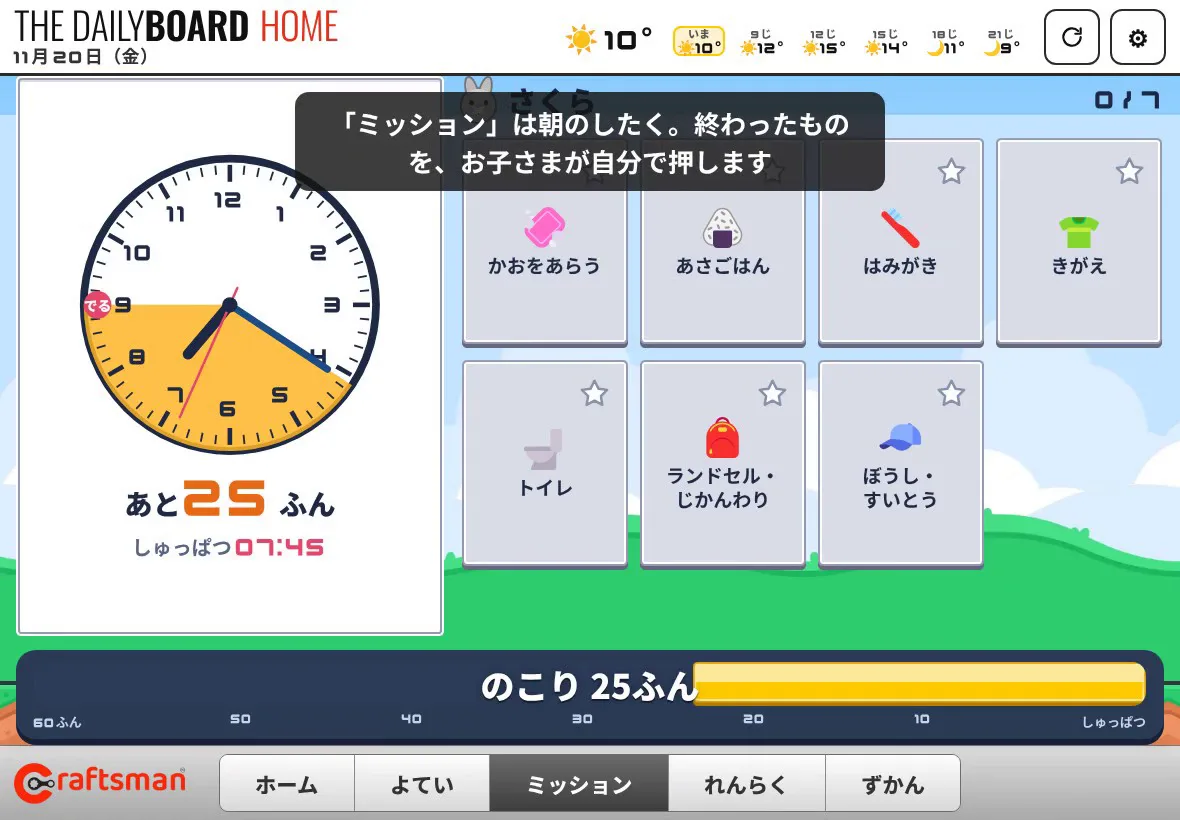
"Missions" is a screen where your child taps each task one at a time to move forward. In the morning there are routines such as "Wash face" and "Get dressed," and after coming home there are tasks such as "Wash hands and gargle," "Hand in the daily journal and handouts," "Homework," and "Get ready for tomorrow." You can choose which items to use and add your own to suit your family.
The screen shows a clock and a bar showing the time left until departure. Because the remaining time is clear at a glance, it is easier for children to be aware of time on their own. On days when your child made it by the departure time, you can look back on it together later in the graph on Home.
On days when homework is finished at Craftsman, the record from the facility is reflected on the board, and "Homework" in the evening Mission is marked automatically. This makes it easier to check, after getting home, whether the homework is done.
"Messages" to family, and the "Picture Book" for meeting new friends
With "Messages," your child can contact their family using set-phrase buttons or short sentences. When a parent reads it, "Read" appears on the child's screen, so they know it got through.
The "Picture Book" is a screen for collecting Craftsman "friends" that you meet by working hard on Missions. We hope it becomes one more fun reason to keep up the daily routine.
Text to fit your child's grade, and English display
The text on the board is shown in kanji and hiragana to match your child's grade. You can also switch to hiragana-only display or to English.
What parents need to do
To get started, open "DAILY BOARD HOME" from "Settings" in the parents' My Page (Japanese page).
Entering lessons and other plans, and loading the school newsletter PDF (and, for schools other than those above, the school lunch newsletter), can be done from My Page or from the board's "Parents" settings. To open the "Parents" settings on the board, press and hold the ⚙︎ at the top right for about one second.
Who can start using it, and tours and trials
DAILY BOARD HOME is a service for families who use Craftsman. Any family with a My Page account can use it at no additional cost.
The atmosphere of the club comes across best when you see it in person. If you are considering enrolling, please feel free to ask us during a tour or trial about how your child can spend their after-school time and how to use the board. Applications are accepted on the Trial, tour and inquiries page.